Amazon PPC for beginners: how Sponsored Products actually work
New to Amazon ads? Here's how Sponsored Products, the click auction, auto vs manual campaigns and match types actually work — in plain English, no jargon.
You've got a listing live, a few sales trickling in, and someone's told you that you "need to run ads". So you open the Advertising tab in Seller Central, see words like auto, manual, broad, phrase, exact, and a box asking for a daily budget — and you quietly close the tab again.
Fair enough. It looks like a cockpit. It isn't, really. Once you understand the handful of ideas underneath, Amazon PPC is far simpler than it pretends to be. Let's walk through it the way we'd explain it to a brand owner over a coffee — no acronyms left dangling.
PPC means you only pay when someone clicks
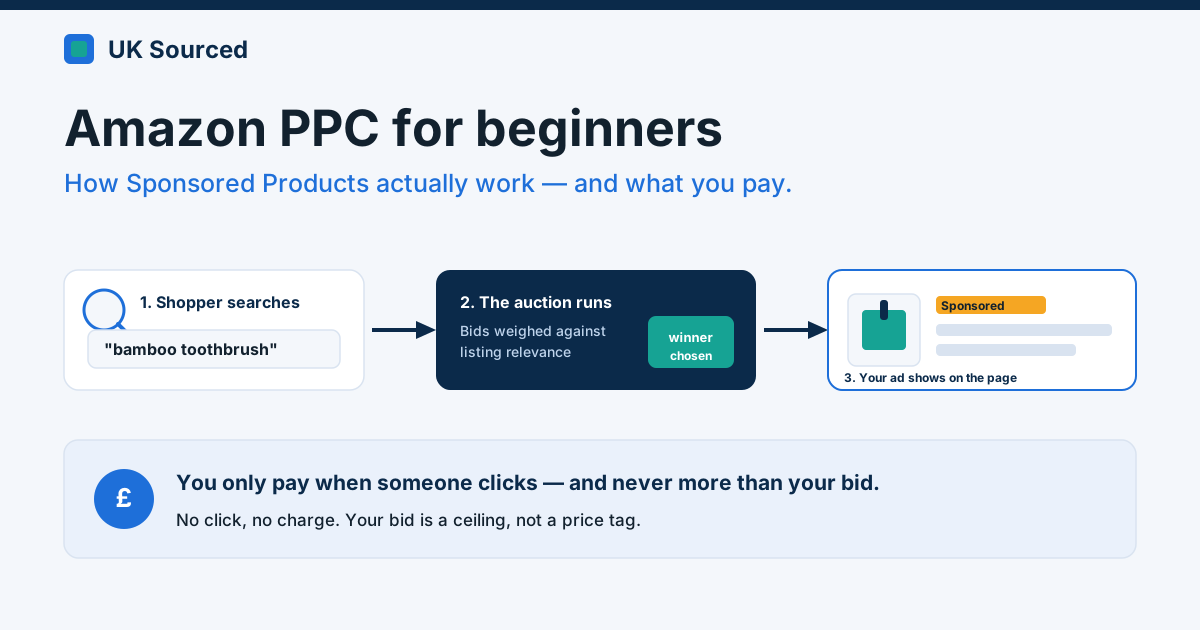
PPC stands for pay-per-click. That's the whole promise in the name. Your ad can be shown to thousands of shoppers and you pay nothing until one of them actually clicks it. No click, no charge.
For most sellers the ad type that matters first is Sponsored Products. These are the listings tagged "Sponsored" that sit in the search results and on product pages, looking almost identical to the organic ones. They're the bread and butter — they send traffic straight to a single product's page, and they're where nearly every new advertiser should start. (There are also Sponsored Brands and Sponsored Display, but ignore those for now. Walk first.)
How the ad auction actually works
Here's the part that surprises people. You don't buy a "slot". You enter an auction, and it runs every single time a shopper types a search.
Say someone searches "bamboo toothbrush". Amazon instantly gathers every advertiser who's willing to pay to show up for that search, looks at what each of them has bid, weighs that against how relevant and likely-to-sell each listing is, and orders the ad placements accordingly. All of that happens before the page finishes loading.
The clever bit — and this genuinely catches people out — is that you don't pay your full bid. Amazon runs what's called a second-price auction. You pay just enough to beat the advertiser below you, plus a penny. So if you bid £1.20 and the next seller down bid 90p, you don't pay £1.20. You pay about 91p. Your bid is a ceiling, not a price tag.
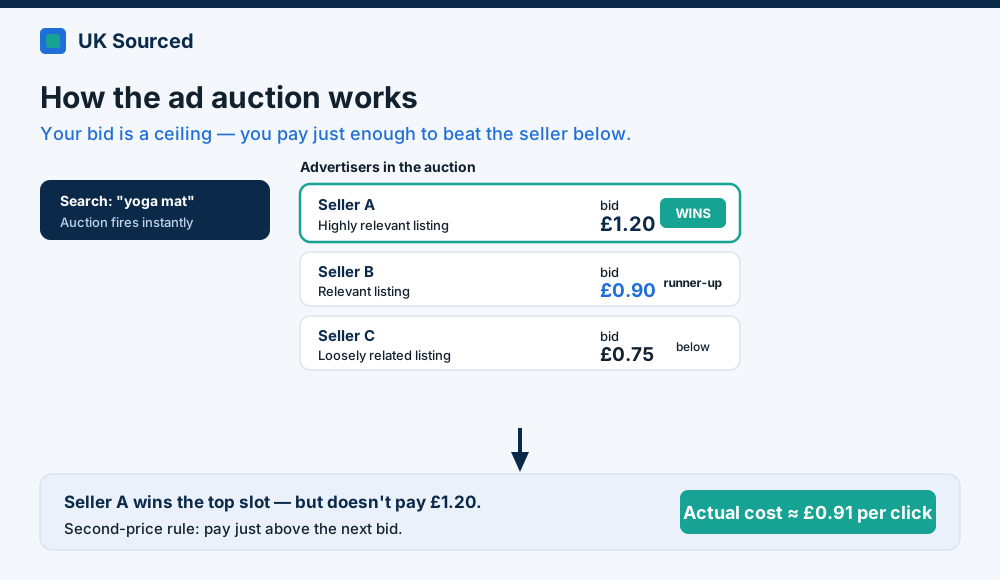 Your bid is the most you're willing to pay per click — not what you'll actually pay. That's the single most reassuring thing to know starting out.
That cost — what you actually pay for a click — is your cost-per-click, or CPC. In competitive UK categories a click might cost 40p, or it might cost £1.50. You don't set it directly. You set your maximum bid and your budget, and the auction sorts out the rest.
Auto vs manual: let Amazon drive, or drive yourself
When you create a campaign, Amazon asks whether you want automatic or manual targeting. This is the first real decision, and it's less scary than it sounds.
Automatic campaigns hand the wheel to Amazon. You pick the product, set a bid and a daily budget, and Amazon decides which searches to show your ad against, based on what it already knows about your listing — your title, your bullets, your category. You're trusting its matching. The upside is you get going in five minutes and, crucially, Amazon shows you which real searches led to sales. That data is gold for a beginner, and you can't get it any other way.
Manual campaigns put you in control. You tell Amazon the exact keywords (or competitor products) you want to appear for, and you set a bid on each one. More work, more precision, less waste — once you know what you're doing.
Our honest advice for a first campaign: run an auto campaign for two or three weeks and let it gather data. Then look at which search terms actually converted, and lift those winners into a manual campaign where you can bid on them properly. Auto finds the gold; manual mines it. That's the loop, and it never really stops.
Match types (only relevant once you go manual)
When you build a manual keyword campaign, each keyword gets a match type. There are three, and they're really just dials for how loosely Amazon interprets your keyword.
- Broad — widest net. Bid on "yoga mat" and you might show for "thick yoga mat", "yoga mat strap", even loosely-related searches. Great for discovery, but you'll pay for some clicks that were never going to buy.
- Phrase — the middle setting. Your keyword has to appear as a phrase, in order, though extra words can sit either side. "Cork yoga mat" would trigger for "eco cork yoga mat" but not for "yoga mat cork coaster".
- Exact — tightest. Your ad shows only for that keyword (and very close variants like plurals). Least waste, most control. This is where your proven winners live.
You don't need to memorise this. Just know that broad explores, exact exploits, and phrase sits in between.
A sensible first-campaign structure
Don't overbuild this. We've seen beginners spin up fifteen campaigns on day one and then have no idea what's happening. Keep it boringly simple:
- One auto campaign for the product. Modest daily budget — say £10 to start — and a default bid Amazon suggests or a touch below. This is your discovery engine.
- One manual exact campaign, which starts empty. As your auto campaign turns up search terms that genuinely sell, you add each as an exact keyword here and bid on it deliberately.
- A negative keyword or two, added as you go. When you spot a search in your reports that's burning clicks and never selling — the wrong-intent stuff, the tyre-kickers — you add it as a "negative" so your ads stop showing for it. This one habit saves more money than any bidding trick.
That's it. Two campaigns and a bit of weekly housekeeping. You can layer on the fancy stuff later, once the basics are earning.
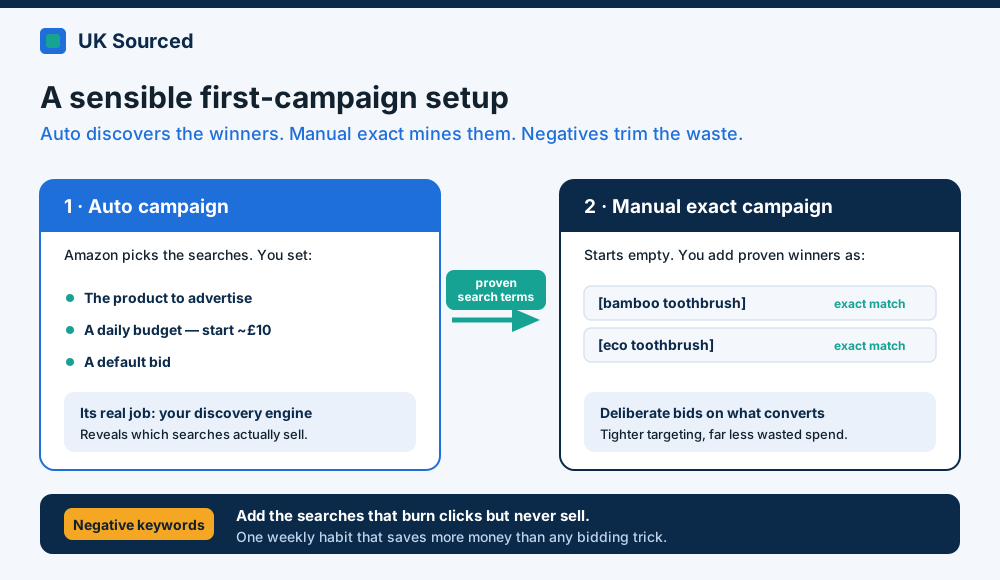 The whole beginner setup on one page: auto discovers, manual exploits, negatives trim the fat. Start here and nowhere else.
Where ACOS ties in
Once the money's flowing, you need one number to tell you whether it's working. That's ACOS — Advertising Cost of Sale. It's the percentage of your ad-driven sales that you spent on the ads. Spend £30, make £120 in sales from those ads, and your ACOS is 25%.
The trap is chasing the lowest possible ACOS. Don't. The cheapest ACOS on earth is zero — you get it by switching your ads off, and selling nothing extra. That's not the goal.
What matters is your break-even ACOS: the point where an ad-driven sale stops making you a profit, which comes straight out of your margin after Amazon's fees and your costs. As a rough steer, a mature, established product should aim for 15–25% ACOS; something in growth, 20–30%; a brand-new launch might sit at 30–50% because you're deliberately buying visibility and data while the listing finds its feet. Judge your number against the stage the product's at, not against a figure off a forum.
(If ACOS is still fuzzy, we wrote a whole plain-English piece on working out your break-even — worth a read before you scale spend.)
Just start small
Genuinely, the biggest mistake we see isn't a bad bid or the wrong match type. It's not starting at all, because the screen looked intimidating. Set a £10 daily budget on one auto campaign, let it run a fortnight, and read what it tells you. You'll learn more from that than from any guide, this one included.
If you'd rather have someone who does this every day set the structure up properly, watch the wasted spend, and turn the winners into a machine — that's a big part of what we do. Drop us a line at enquiries@uksourcedltd.com and we'll take a look at your account.