Why is my Amazon listing suppressed — and how do I fix it fast?
Amazon listing suppressed and invisible in search? Here are the real causes — title length, missing attributes, images, policy flags — and the fast fix.
Your product's still there. You can find it by pasting the ASIN into the search bar. But type the actual keyword a customer would use, and it's nowhere. Page one, page five, page nothing.
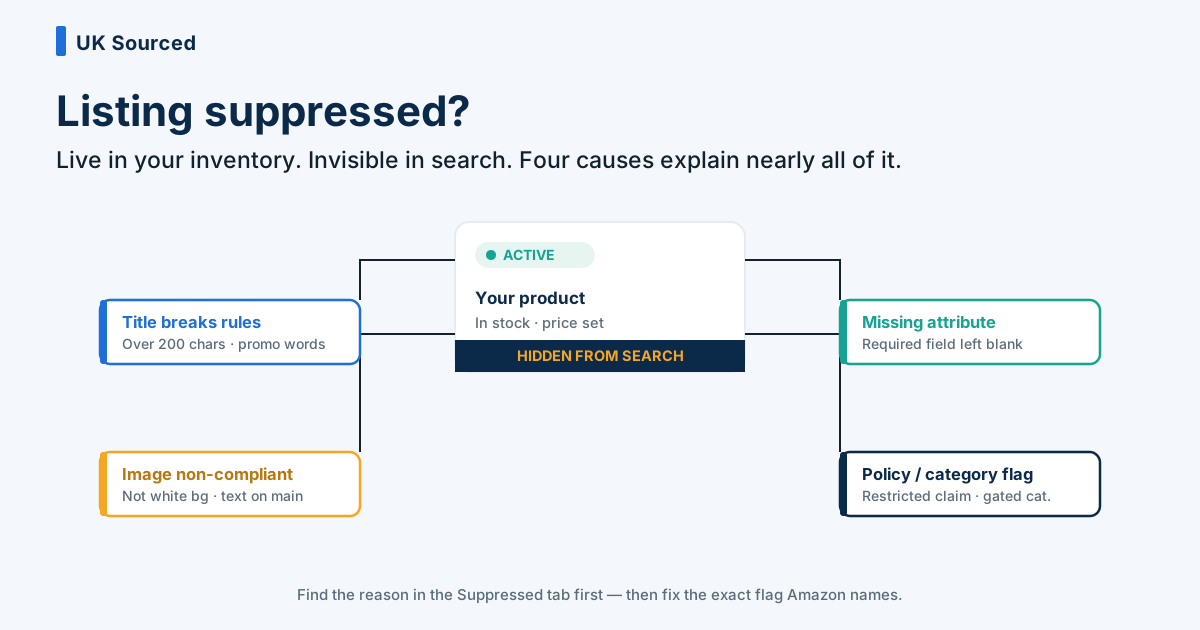
That's suppression, and it's one of the most quietly damaging things Amazon can do to a listing. The product stays "active" in your inventory — green status, stock showing, everything looks normal from the seller side. Meanwhile it's been pulled out of search results, so real shoppers can't stumble across it. Sales don't crash. They evaporate. And because nothing in Seller Central shouts at you, plenty of sellers don't notice for a week or two.
The good news: suppression is nearly always fixable, and usually fast. The cause is almost always one of a short list. Let's go through them.
First, confirm it's actually suppressed
Before you start changing things, make sure that's what you're dealing with. Go to Inventory → Manage All Inventory, then look for the Suppressed tab (or filter by listing status). Amazon flags suppressed listings there and, more usefully, tells you why — it names the problem attribute or the rule you've broken.
There's also Fix Your Products under the Catalogue menu, which surfaces the same alerts with a bit more detail. Read the reason Amazon gives you. It's not always beautifully worded, but it points at the culprit, and that saves you guessing.
If the listing genuinely isn't in the suppressed list but still isn't appearing in search, you might be looking at a different problem — a ranking collapse, a stockout, or low-inventory throttling. Those are separate issues (we've written about diagnosing sudden sales drops). Suppression proper is when Amazon has explicitly parked the listing for a compliance reason.
Cause 1: the title breaks the rules
This is the most common one by a mile. Amazon has firm rules about product titles, and if yours trips one, the listing gets suppressed from search until you fix it.
The usual offenders:
- Too long. Amazon suppresses titles that run over the character limit — for most categories that's around 200 characters. Sellers stuff titles with every keyword they can think of, sail past the limit, and get pulled. Ironically, the keyword-cramming that was meant to help ranking is the exact thing that kills visibility.
- Promotional language. Words like "free shipping", "best seller", "sale", "100% guarantee", "% off" — Amazon doesn't want that in a title. It'll flag it.
- Odd formatting. ALL CAPS, symbols like ! or ~ or *, emoji, or repeated words. Titles are meant to read cleanly: Brand + product + key attributes.
- Missing the brand or a required word. Amazon expects your title to start with the brand name and follow the category's expected structure.
The fix is exactly what you'd guess. Rewrite the title so it's under the limit, drops the promo words, and reads like a human wrote it. Brand first, then what the thing actually is, then the attributes that matter (size, colour, count). Honestly, tidier titles usually convert better anyway, so this is rarely a loss.
Cause 2: a required attribute is missing
Every category on Amazon has a set of required attributes — fields the listing must have filled in. Country of origin. A batteries flag. Age grading on toys. Material, hazmat status, a valid product type. Miss one Amazon has since decided is mandatory, and the listing can be suppressed until you supply it.
This one catches people out because the listing worked fine for months. Then Amazon updates the requirements for that category — adds a new mandatory field, tightens an existing one — and listings that were compliant yesterday are suppressed today. You didn't change anything. The goalposts moved.
Fix it by opening the listing in Manage All Inventory → Edit, working through every tab (not just the one Amazon flagged — sometimes there's more than one gap), and filling anything marked required. Save, and the listing usually restores within a few hours, sometimes minutes.
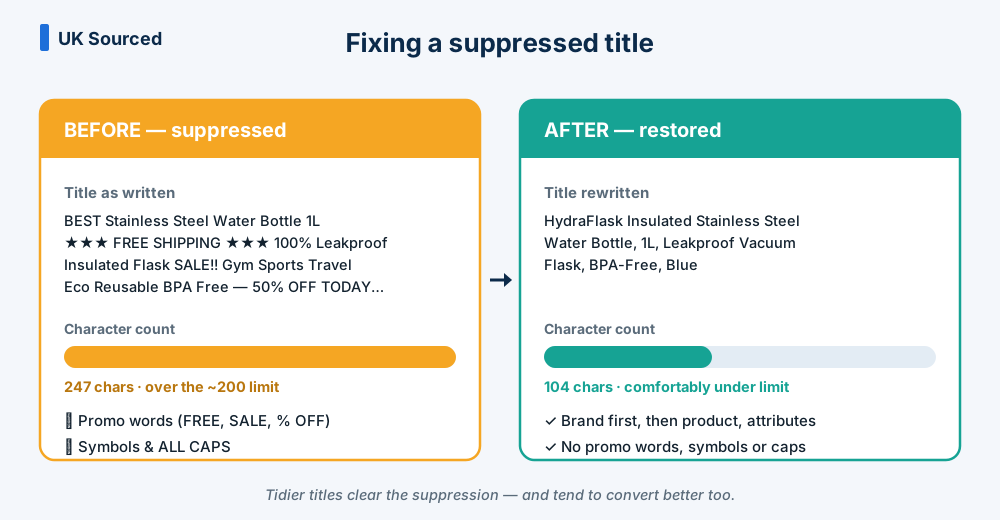 The single most common fix: an over-long, promo-stuffed title trimmed to a clean, compliant one.
Cause 3: the images don't meet Amazon's standards
Amazon has strict image rules, and the main image is where it's strictest. Break these and the listing can be suppressed:
- Main image must be on a pure white background (RGB 255,255,255). No lifestyle scenes, no props, no coloured backdrop for the primary image.
- No text, logos, watermarks, badges or borders on the main image. That "SALE" flash or the "As seen on TV" sticker will get you flagged.
- The product must fill about 85% of the frame and be the only thing shown — no bundles or accessories that aren't included.
- Minimum resolution (1,000px on the longest side so zoom works) and an accepted file format.
Swap the offending image for a compliant one and re-upload. If your main image is the problem, that's your priority — it's the one shoppers see in search results, so a suppression here hurts twice.
Cause 4: a policy or category flag
This is the trickier bucket. Sometimes suppression isn't a formatting slip — it's a compliance or policy issue. Restricted keywords in the listing (medical claims, "cure", "FDA approved", anything that reads as a health or safety promise). A product that's landed in a gated or restricted category. A pesticide or supplement claim that needs documentation. A safety or compliance flag Amazon wants evidence for.
These take longer because you often can't just edit a field and move on. You may need to remove the offending claim from the copy, or open a case with Seller Support and provide documentation — a compliance certificate, an invoice, an ingredients breakdown. Read the suppression reason carefully; it'll tell you whether this is a quick copy edit or a paperwork job. (This is the one category where we'd genuinely say don't wing it — get the wording right the first time, because repeated failed edits can draw more scrutiny, not less.)
The fast fix, step by step
Here's the order we work through it:
- Find the reason. Inventory → Suppressed tab, or Fix Your Products. Read what Amazon says is wrong. Don't skip this and start guessing.
- Fix the named issue. Rewrite the title, add the missing attribute, swap the image, or strip the restricted claim — whatever's flagged.
- Check for a second problem. Suppression often hides a queue. Once you clear the first flag, another can surface. Work every required field, not just the obvious one.
- Save and give it time. Most edits restore the listing within a few hours. Attribute and title fixes are usually quickest.
- If it doesn't clear, open a case. For policy and category flags, or if a fix genuinely won't take, raise it with Seller Support with your evidence attached. Be specific and calm.
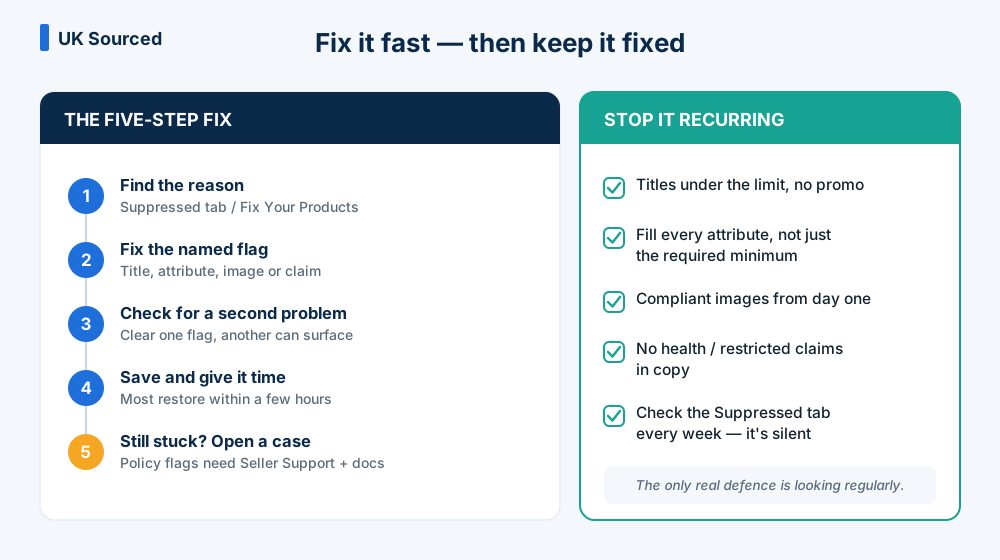 The five-step fix, plus the prevention habits that keep listings out of the suppressed tab.
How to stop it happening again
Prevention here is cheap and dull, which is exactly why it works.
Keep titles under the limit and free of promo language from the start — build them right and you never trip the rule. When you list a new product, fill every attribute field, not just the required minimum; it future-proofs you against Amazon tightening the rules later. Use compliant images on day one. And check the Suppressed tab as part of your weekly routine, not just when sales dip — the whole danger of suppression is that it's silent, so the only real defence is looking regularly.
For the brands we manage, this is baked into a weekly account-health sweep. Nobody has to remember to look, because it's on the checklist. That's the difference between catching a suppression the day it happens and discovering it a fortnight later with a hole in your revenue.
If you've got a listing that's dropped out of search and the reason isn't obvious, or you'd rather not spend your afternoon deciphering Amazon's error messages — that's the sort of thing we sort out quickly. Drop us a line and we'll take a look.