Negative keywords: the fastest way to stop wasting ad spend
Negative keywords are the quickest win in Amazon PPC. Here's negative exact vs phrase, how to mine your search-term report, and a 20-minute weekly routine that saves money.
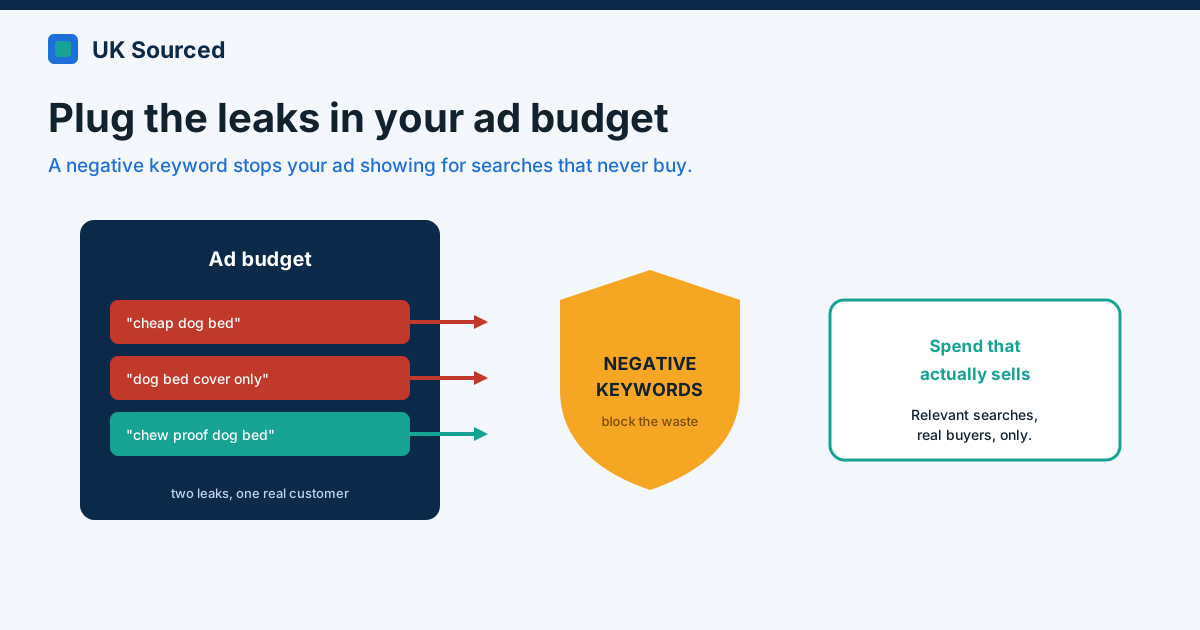
Right now, some of your ad budget is being spent on clicks that were never going to buy. Everyone's is, a little. The only questions that matter are how much, and how quickly you can turn the tap off. Negative keywords are that tap — and switching them on well is the highest-return twenty minutes you'll spend in Amazon advertising all week.
If you're brand new to campaigns, it's worth reading how Sponsored Products actually work first. This picks up where that leaves off: not launching ads, but stopping them leaking.
What a negative keyword actually does
A normal keyword tells Amazon "show my ad when someone searches this." A negative keyword does the opposite: "whatever you do, don't show my ad for this." That's it. You're not bidding on it, you're banning it.
Why would Amazon show your ad for something irrelevant in the first place? Because broad and auto campaigns are designed to explore. You bid on "dog bed" and Amazon, trying to be helpful, also shows you for "dog bed cover", "cat bed", "cheap dog bed", "dog bedding for crates". Some of those are gold. Some are pure waste. Negatives are how you keep the first and bin the second.
Negative exact vs negative phrase
There are two flavours, and the difference is worth ten seconds of your attention because using the wrong one either does nothing or nukes too much.
Negative exact blocks one precise search, and only that. Add cat bed as a negative exact and you stop showing for the exact phrase "cat bed" — but you'd still show for "cat bed large" or "luxury cat bed". Surgical. Use it when one specific term is wasting money but its neighbours are fine.
Negative phrase blocks anything containing those words in that order. Add cover as a negative phrase and you stop showing for "dog bed cover", "cover for dog bed", "replacement dog bed cover" — the whole family, in one move. Use it when a word reliably signals the wrong shopper.
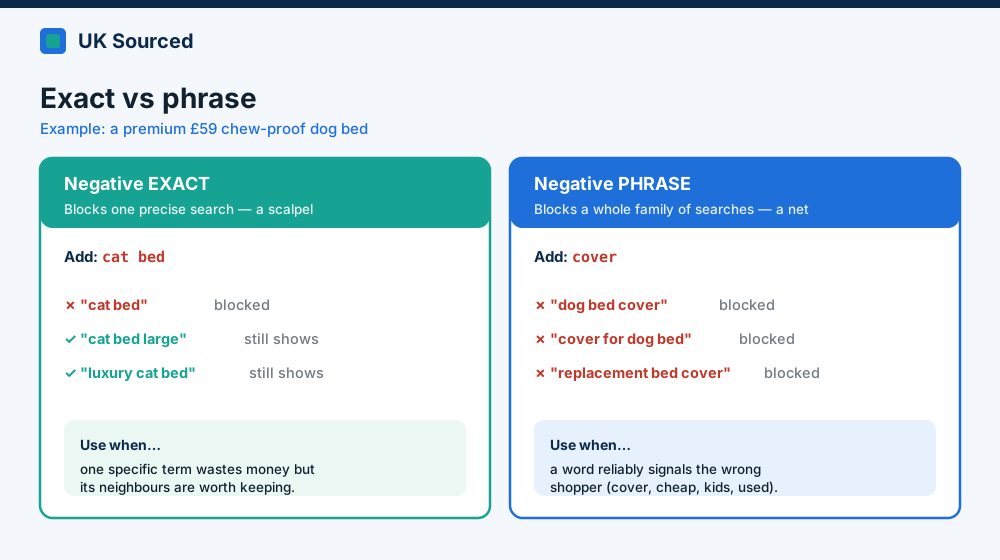 Same seller, two tools. Exact is a scalpel; phrase is a net. Pick by how wide the problem is.
Quick worked example. You sell a premium, chew-resistant dog bed at £59. Your search-term report shows spend going to "dog bed cover only", "cheap dog bed" and "cat bed". You'd likely add cover and cheap as negative phrases (they'll never want your £59 bed), and cat bed as a negative exact if you still want to appear for other cat-related terms you're testing. Two minutes. Real money saved.
Where the leaks show up: the search-term report
Everything you need lives in one place — the search-term report (Sponsored Products → reports). It shows the actual phrases shoppers typed, as opposed to the keywords you bid on. That gap is where the waste hides.
Pull it up, sort by spend, highest first, and look at the top spenders with zero orders. Each one is a question: is this term relevant to my product or not?
- Irrelevant and spending with no sales → negate it (exact or phrase, depending on how wide the problem is).
- Relevant but expensive with no sales yet → don't negate. Lower the bid, or give it a little longer. Negating a genuinely relevant term is how you accidentally throttle a future winner.
- Relevant and converting → the opposite job: "harvest" it into its own exact-match keyword so you can bid on it deliberately.
That last point matters. The search-term report isn't only a hit list for negatives; it's also where you find the profitable terms worth promoting.
Your 20-minute weekly routine
You don't need software for this. You need a calendar reminder.
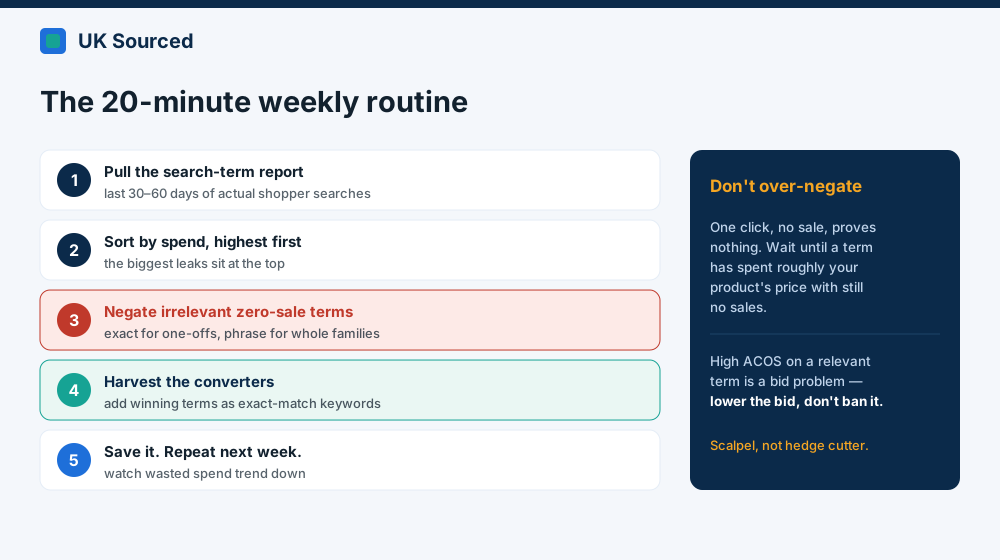 The whole job, once a week. It compounds — every negative you add keeps saving money for as long as the campaign runs.
- Pull the last 30–60 days of the search-term report.
- Sort by spend, highest first.
- Scan the top spenders with no sales. Negate the clearly irrelevant ones — exact for one-offs, phrase for whole families.
- While you're there, grab the converting terms and add them as exact-match keywords in a manual campaign.
- Save the report. Next week, compare — you're looking for the wasted spend trending down.
The mistake nearly everyone makes: negating too hard
Here's where enthusiasm backfires. Somebody discovers negatives, opens the report, and starts blocking anything with a high ACOS or a click and no sale. Don't.
One click with no order proves nothing — it might convert on the third. As a rough guide, wait until a term has spent roughly the price of your product with still no sales before you swing the axe, and even then only if it's genuinely irrelevant. High ACOS on a relevant term is a bid problem, not a negative-keyword problem. Lower the bid; don't ban the term.
Honestly, this is the trap we see most: a well-meaning founder negates a chunk of their own best long-tail terms in an afternoon and quietly caps their own sales. Trim with a scalpel, not a hedge cutter.
Do this properly and it's the cheapest optimisation in your whole account — no new budget, no clever bidding, just less money going where it shouldn't. If you'd rather someone kept that search-term report tidy for you every week (and harvested the winners while they're at it), that's bread-and-butter for us. Drop a line to enquiries@uksourcedltd.com.